Getting started
Archprint mines the architecture rules your repo already follows, gates them on evidence, and emits them into the tools you already use.
Find the rules your code already follows:

See the evidence behind one:

Enforce them in ESLint, watch a break get caught, and remove it all again:

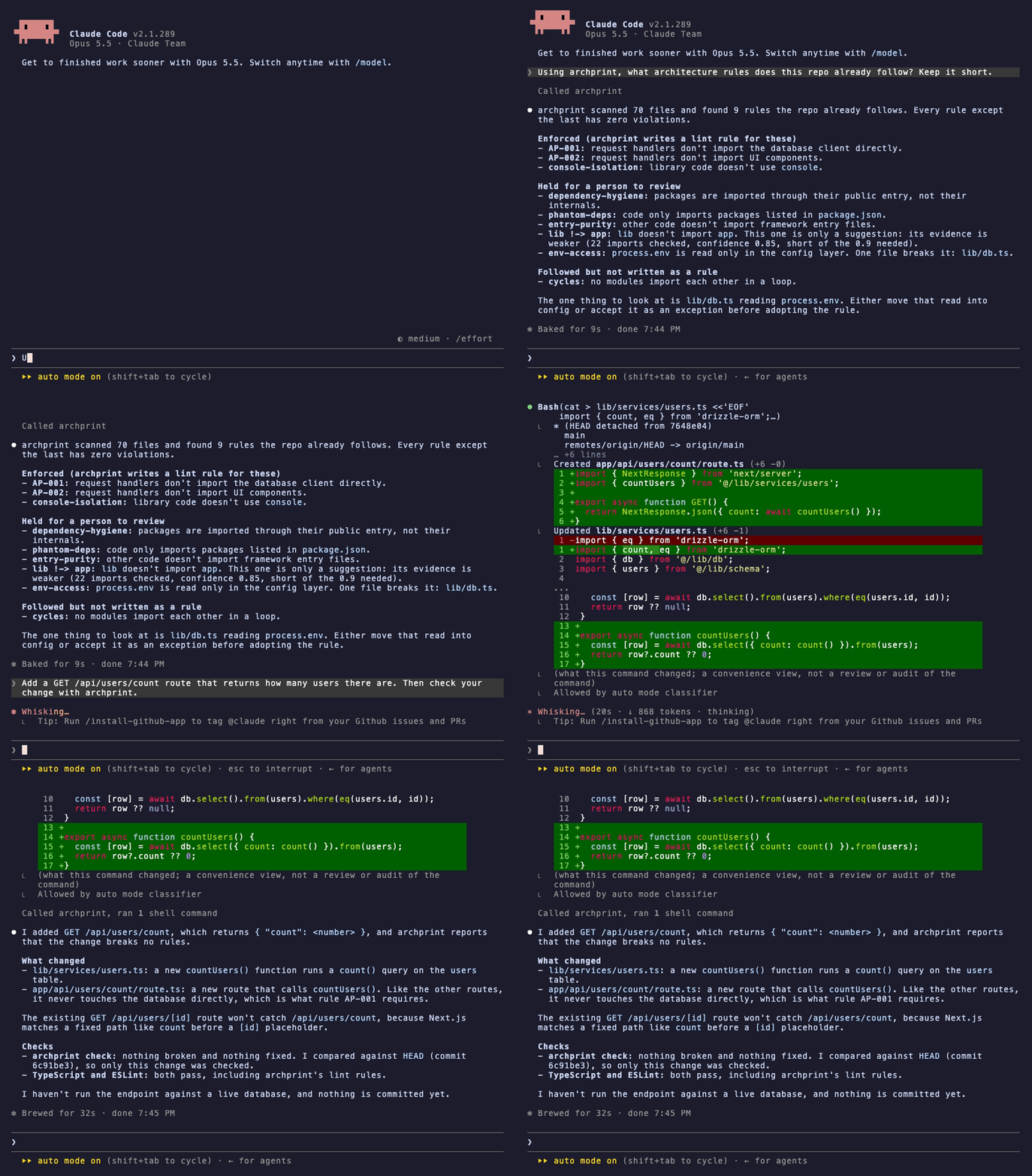
Or just ask your agent. Claude Code lists the rules with what is enforced and what is held for review, then adds a route and checks its own change with archprint before it reports back:
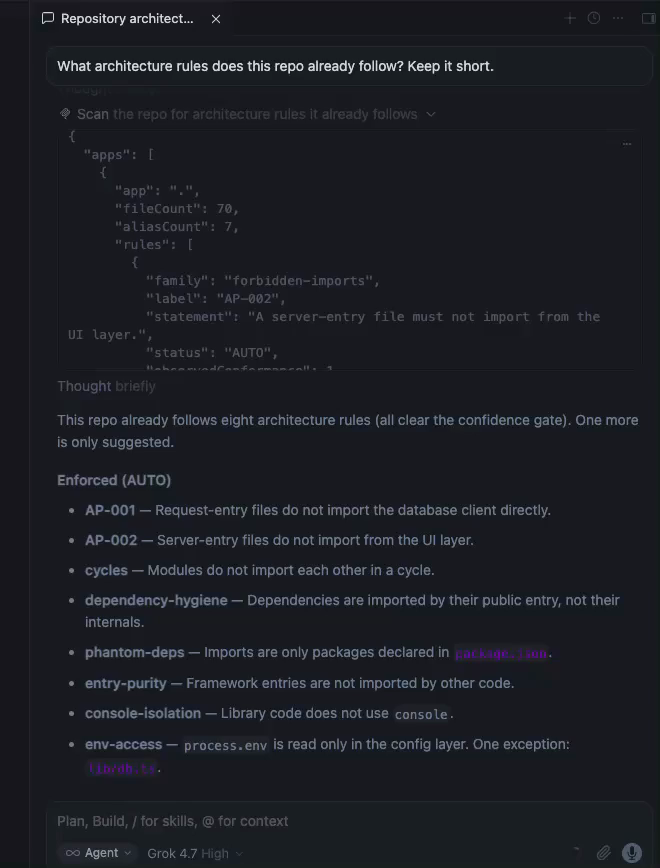
Cursor works the same way, with Grok 4.7 rather than Claude. In the desktop app's chat, its agent called archprint's scan tool on its own; this screenshot shows the tool result and the answer:
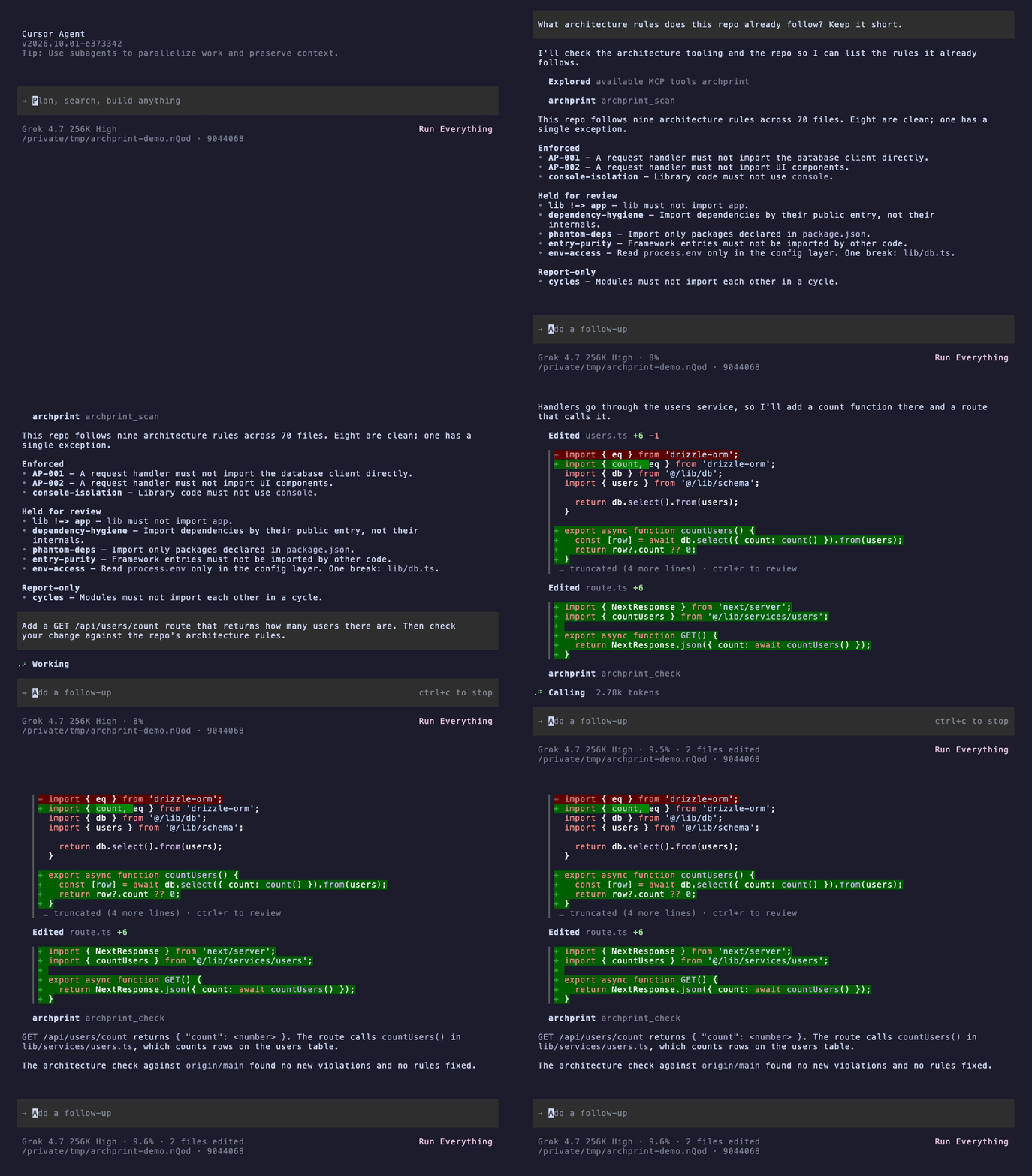
In the terminal (cursor-agent), it does the same: lists the rules, then adds the route and checks it with archprint_check:
Measured, with and without archprint. The same question in Claude Code (Opus 5.5) on the demo app (70 files), five runs each, median [range]:
| Without archprint | With archprint | |
|---|---|---|
| Tokens read | 81k [58k to 96k] | 52k [52k to 52k] |
| Tokens written | 1.1k [1.1k to 1.4k] | 0.6k [0.6k to 0.6k] |
| Cost per question | $0.083 [$0.078 to $0.153] | $0.037 [$0.032 to $0.076] |
| Time | 17 s [15 to 19] | 10 s [9 to 31] |
| Tool calls | 5 [4 to 10] | 2 [2 to 2] |
Both found the main rule (routes reach the database only through lib/services/). With archprint, every run gave the evidence for each rule and named the one file that breaks one (lib/db.ts reads process.env outside the config layer); no run without it noticed that. Without archprint, Claude also described naming conventions archprint does not check. About 50k of the tokens read in both columns are Claude Code's own system prompt. This is one small repo; larger ones are not measured yet. Method, harness and every answer.
Try it in your browser
Open the demo in StackBlitz, nothing to install. It is a small Next.js API whose routes reach the database only through a service layer. The scan runs as soon as it opens, and the demo's README walks through enforcing a rule in ESLint, breaking it, and asking for the rules over MCP.
Install
npm install --save-dev archprintOr run it without installing with npx archprint scan ., or build from source:
git clone https://github.com/Tommkruix/archprint
cd archprint
npm ci
npm run build
node dist/cli.js scan <path-to-your-app>
Requires Node >= 20. Point Archprint at a directory that has a tsconfig.json (for a monorepo, a package such as apps/web; a monorepo root works too, Archprint discovers the app directories and skips whatever git ignores, including nested .gitignore files and .git/info/exclude).
The 60-second path
# One command: detect the stack, enforce the rules your code already follows,
# and record what to adopt next in .archprint/config.json
archprint init apps/web
init scans the repo, writes the auto-trusted (mechanical) rules into .archprint/ (only for the linters your repo uses, it detects ESLint and dependency-cruiser), adds a managed section to your README.md explaining what it did, and prints the tiers: what is enforced now, what your code follows that is reported but not written as a rule yet (circular dependencies today), what to review before enforcing, and what comparable repos commonly adopt that you do not yet. Then reference the generated rules from your linter:
archprint wire # inserts a managed, reversible reference into your eslint / dependency-cruiser configRun your linter (eslint, dependency-cruiser) as usual and the archprint rules are in effect. To undo everything:
archprint eject # removes the generated files and every wired reference, restoring your configs exactlyThe deliberate path
If you would rather inspect before you enforce:
# See the rules your repo already follows, with the evidence
archprint scan apps/web

# Drill into one rule: gate breakdown, offending lines, how to fix, when not to use it
archprint explain AP-002 apps/web

# Write the auto-trusted mechanical rules (structural ones are held for review)
archprint generate apps/web

# Check the generated rules pass on your repo before you wire them
archprint generate apps/web --check

# Emit one specific rule after reviewing it (including a SUGGEST rule)
archprint generate apps/web --rule AP-001

# Narrow the output, or force a format regardless of detected tooling
archprint generate apps/web --only console
archprint generate apps/web --emit all

# Also emit the structural-inference families (review these first)
archprint generate apps/web --include-structural

# Adopt only the rules you choose, by id
archprint generate apps/web --include-structural --rules no-lib-to-app,import-style

# Also write the granular per-family files, rule cards, fixtures, and graph
archprint generate apps/web --expand
generate re-cleans its own previous output each run, so the generated rules never drift from the current code. The default output is one self-contained .archprint/eslint.mjs (adopt it in one line with import archprint from './.archprint/eslint.mjs') and, when dependency-cruiser is present, one .archprint/dependency-cruiser.json; --expand adds the per-family configs, per-rule cards and fixtures, and ts-arch tests for the first-party boundaries (architecture.archprint.ts, opt-in: import it from a test, or point your test glob at it, so it is not collected until you choose).
Upgrading an existing project from an older archprint-rules/ layout? Run archprint migrate once (after updating the package); it moves everything to .archprint/ and rewires your linter config in place.
For a fresh or thin repo
archprint recommend apps/webrecommend works even with little code to learn from: it sorts every rule family into enforce-now / followed-but-reported-only / review / adopt-from-day-one, names the installed tool that will enforce each rule it can write (or what to install), and the adopt tier is backed by a census of tens of thousands of public TypeScript repos (stack-aware), not hand-picked defaults.
CI
archprint check reports only the violations a change introduces, compared with a base branch, for the rules your team adopted with init or generate. The existing backlog never shows up, and every finding carries its evidence. It works in any CI, and on GitHub it shows each finding inline on the pull request (see it on a demo pull request).
On GitHub, use the archprint check Action (on the GitHub Marketplace):
# .github/workflows/archprint.yml
name: archprint
on: pull_request
permissions:
  contents: read
jobs:
  check:
    runs-on: ubuntu-latest
    steps:
      - uses: Tommkruix/archprint-action@v1
It checks out the pull request itself, so it needs no checkout step. The same check in plain steps, without the Action:
# .github/workflows/archprint.yml
name: archprint
on: pull_request
permissions:
  contents: read
jobs:
  check:
    runs-on: ubuntu-latest
    steps:
      - uses: actions/checkout@v5
        with:
          ref: ${{ github.event.pull_request.head.sha }}
          fetch-depth: 0
      - uses: actions/setup-node@v5
        with:
          node-version: 22
      - run: npm ci
      - run: npx archprint check --base ${{ github.event.pull_request.base.sha }} --format github
Warning by default. Add
--fail-on new(or the Action'sfail-on: new) to fail the job on a new violation, then mark the job a required status check in your branch protection so a pull request that adds one can't merge.Only adopted rules.
checkreads the adopted rules in.archprint/config.json, written byinitandgenerate, and checks only the rules recorded there: the mechanical rules, plus layer boundaries once you adopt them with--include-structural. Rules adopted in the same pull request are listed but never counted against it.Imports that resolve to nothing are TypeScript's job. Run
tsc --noEmitin CI, or rely on the type checknext buildruns by default: it reports a missing module (TS2307) with your project's own module resolution. Archprint does not generate this rule, and on a TypeScript appimport/no-unresolvedor dependency-cruiser'snot-to-unresolvabletend to report false errors onpathsaliases, packageexportsand bundler suffixes such as?raw.A justified exception needs a reason. When a file has a real reason to break a rule, record it:
npx archprint allow AP-001 app/api/health/route.ts --reason "Health check queries the database directly". It goes in theallowedlist of.archprint/config.json,checkstops counting it and lists it with its reason in the pull request, and the nextarchprint generatestops the generated rules flagging it. An entry without a reason is rejected, and an entry the code no longer needs is pointed out. Rules enforced through dependency-cruiser (public API) are not covered on that side yet.Removing rules is never silent. If a pull request deletes
.archprint/config.json, or the rules in it, that the base branch has,checkwarns and lists every rule that stops being checked. It does not fail the job, because dropping a rule can be a deliberate team decision. To make that decision need a reviewer, add a CODEOWNERS entry and turn on "Require review from Code Owners" in branch protection:text/.archprint/ @your-team /.github/workflows/ @your-teamUpgrading: from 0.8.x or earlier, run
archprint generateonce to record the adopted rules. Until you do,checkposts a notice that it did not run and exits 0. Setups from 0.9.0 to 0.11.x keep working as they are:checkstill reads theirrules.jsonandallow.json, and the nextgeneratemoves both intoconfig.json.Other CI systems:
--format jsongives version-keyed output, and the exit code is the contract:0ok,1new violations with--fail-on new,2the CI setup is wrong (for example a shallow clone without the base commit). Check out the full history (fetch-depth: 0or your CI's equivalent).Safe on pull requests from forks. It needs only read access, uses no secrets, and never runs your code.
scan --json and recommend --json also emit stable, version-keyed JSON for scripting, with exit code 0 on success and 1 on error.
Use with AI agents (MCP)
archprint mcp runs archprint as an MCP server over stdio so Claude, Cursor, and other agents can inspect the rules your repo already follows before they write code. It exposes read-only archprint_scan, archprint_recommend, archprint_explain, and archprint_check tools. Each rule comes back stated in plain words, with its evidence, the files that break it, and whether archprint enforces it, holds it for review, or only reports it. archprint_explain takes any rule label from the scan (for example AP-002 or env-access). archprint_check reports the adopted rules the agent's current change breaks, uncommitted edits included, so it can fix them before it finishes. Point any MCP client at it:
{
  "mcpServers": {
    "archprint": { "command": "npx", "args": ["-y", "archprint", "mcp"] }
  }
}
If the client says the server failed to start or npx was not found, it cannot see your shell's PATH. Desktop apps opened from the Dock or Start menu do not load it, which is common when Node comes from nvm or Homebrew. A full path to npx alone is not enough, because npx itself needs node on the PATH. Point both at the folder that dirname "$(which node)" prints, for example /opt/homebrew/bin:
{
  "mcpServers": {
    "archprint": {
      "command": "/opt/homebrew/bin/npx",
      "args": ["-y", "archprint", "mcp"],
      "env": { "PATH": "/opt/homebrew/bin:/usr/bin:/bin" }
    }
  }
}
Starting the editor from a terminal also works, because it then inherits your shell's PATH.
One-line installs. In Claude Code:
claude mcp add archprint -- npx -y archprint mcpIn Cursor, put the JSON above in .cursor/mcp.json in your project (or ~/.cursor/mcp.json for every project), then enable archprint under Settings > MCP.
That is a local stdio server over the repo you point the client at, and it is the one to use for private code: your source never leaves your machine, whichever git host you use.
To scan a public repository by URL instead, run a remote server over HTTP with archprint mcp --http: it clones the repo shallow to a temp dir (public github.com, gitlab.com, or bitbucket.org only), runs the same read-only analysis, returns the result, and deletes the clone. The tools then take a repo URL and an optional ref. It binds 0.0.0.0:8848/mcp by default; pass --host 127.0.0.1 to keep it on your own machine, or --port (or $PORT) to change the port. Health checks answer at /health (use this one on Cloud Run, which reserves /healthz) and /healthz. Every request clones and scans, so keep a hosted instance behind authentication, such as Cloud Run's IAM, unless you accept paying for anyone's scans.